
How to Deploy Code to an Ubuntu Server Using GitHub Actions
This tutorial explains how to automatically deploy code from GitHub to an Ubuntu server using SSH and GitHub Actions. Once configured, every push to the main branch will update the code on your server automatically.Start writing here...
Prerequisites
Before starting, make sure you have:
An Ubuntu server with a public IP
SSH access to the server
A GitHub repository
Git installed on the server
A user with permission to deploy code (root or sudo user)
Step 1: Generate an SSH Key on the Server
1. Login to your server
ssh root@IP_Address
2. Generate an SSH key
Run the following command:
ssh-keygen -b 4096

Press Enter for all prompts
This will generate:
Private key: id_rsa
Public key: id_rsa.pub
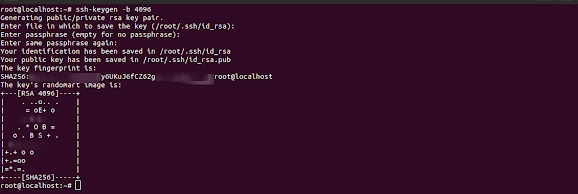

✅ SSH key generation completed.
Step 2: Add Public Key to authorized_keys
Allow the server to authenticate using this key:
cat ~/.ssh/id_rsa.pub >> ~/.ssh/authorized_keys
Set correct permissions:
chmod 600 ~/.ssh/authorized_keys
chmod 700 ~/.ssh
Step 3: Create Secrets in GitHub
Go to your GitHub repository → Settings → Secrets and variables → Actions
1. SSH_KEY (Private Key)
On the server:
cat ~/.ssh/id_rsa
Copy the entire private key and paste it into Secret:
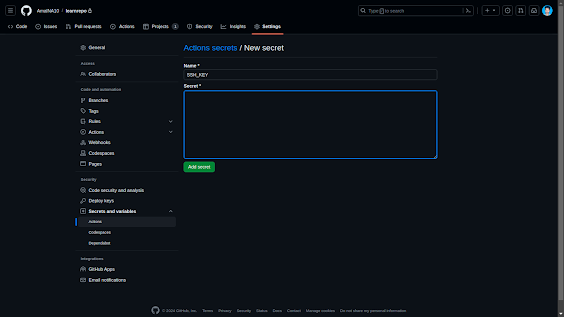
Name: SSH_KEY
Secret: (private key content)
2.Create two more secrets, HOST and USERNAME.
2.1. HOST
Name: HOST
Secret: Server IP address
Example:
123.456.78.90
2.2. USERNAME
Name: USERNAME
Secret: Server user (example: root)
Step 4: Add Public SSH Key to GitHub Authentication Keys
Go to GitHub → Settings → SSH and GPG keys→New SSH Key
Click New SSH key
On the server, copy the public key:
cat ~/.ssh/id_rsa.pub
Click on 'New SSH key' and paste the public ssh key.
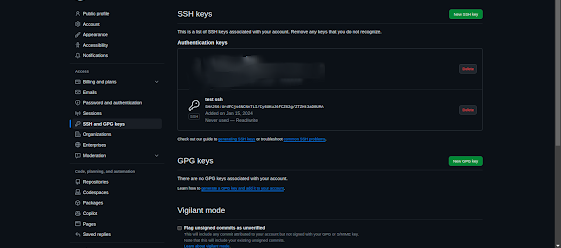
This allows GitHub to authenticate with your server securely.
Step 5: Clone the Repository on the Server
On your server:
git clone -b main --depth 1 git@github.com:YourUserName/YourRepository.git
Make sure the repository is cloned into the deployment directory, for example:
/odoo/custom-addons/learnrepo
Step 6: Create a GitHub Action Workflow
Go to your repository
Click Actions
Select Set up a workflow yourself
Paste the following configuration
name: Auto Deploy

on:
  push:
    branches: [ main ]

jobs:
  build:
    runs-on: ubuntu-latest

    steps:
      - name: Deploy using SSH
        uses: appleboy/ssh-action@master
        with:
          host: ${{ secrets.HOST }}
          username: ${{ secrets.USERNAME }}
          key: ${{ secrets.SSH_KEY }}
          port: 22
          script: |
            cd /odoo/custom-addons/learnrepo
            git pull origin main
5. Click Commit changes
Step 7: Verify Deployment
Go to the Actions tab in GitHub
Push a change to the main branch
The workflow will run automatically
A green check-mark ✅ indicates successful deployment